Browse the Feed
The Home tab shows all active listings. Scroll to browse, or use the tools below to narrow your search.
- Search bar — search by breed, keyword, or location. Your last 5 searches are saved for quick access
- Bloodline chips — tap a bloodline chip at the top of the feed to instantly filter by that bloodline
- Bird of the Day — a featured listing highlighted at the top of the feed
- Featured Carousel — premium listings shown in a horizontal scroll at the top
- Recommended Section — listings picked based on your browsing history
- Grid / List toggle — switch between a compact grid view and a detailed list view
Filters
Tap the Filter icon to open the filter panel. You can filter by:
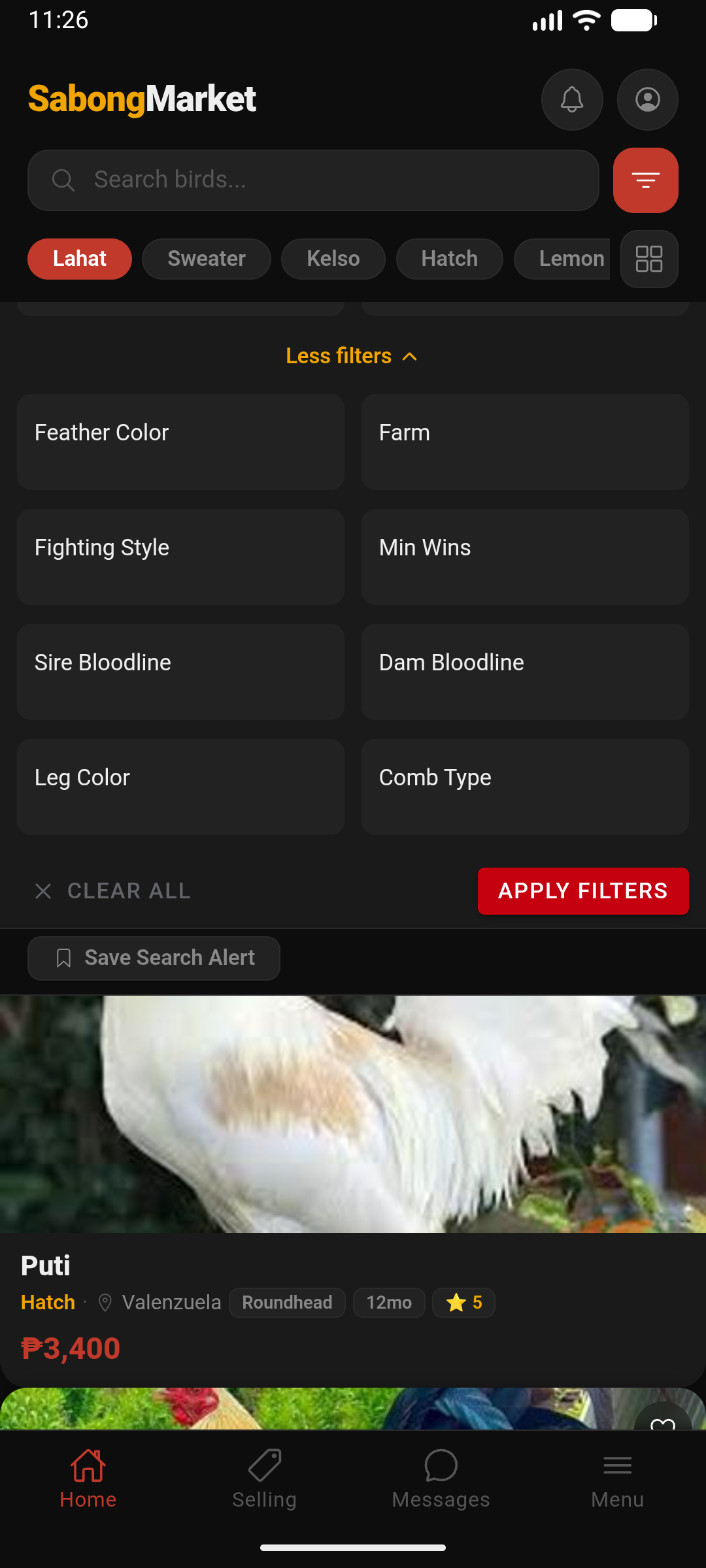
- Bloodline
- Price range (min / max)
- Purpose — Sale, Stud, or Trade
- Location (province or city)
- Sex — Cock, Hen, Stag, Pullet
- Feather color
- Leg color
- Comb type
- Fighting style
- Origin farm
- Sire bloodline
- Dam bloodline
- Near Me — GPS-based distance filter. Toggle it on and select a radius: 10, 25, 50, or 100 km. Requires location permission
- Verified Only — toggle to show only listings from verified sellers. Useful when you want extra confidence in who you're buying from
Active Filter Chips & Result Count
When filters are active, the filter panel shows:
- A result count at the top (e.g., "42 results") so you know how many listings match
- Active filter chips — each applied filter appears as a removable chip. Tap the ✕ on any chip to remove that filter instantly without opening the full panel
Sort Options
Tap Sort to order results by: Newest, Oldest, Price (low to high), Price (high to low), Most Wins, Age, or Weight.
Listing Detail
Tap any listing to see the full detail page:
- Photo gallery — swipe through all photos. Tap any photo to open a full-screen lightbox
- Pedigree tree — if the seller added lineage info, you'll see an interactive sire/dam tree with photos, W/L/D records, and notable wins. Tap any ancestor to expand
- Seller info — farm name, trust level, verification badge, rating, response rate, and member since date
- Similar listings — related birds shown at the bottom of the page
- Negotiable tag — if the seller marked the price as negotiable, you'll see a "Negotiable" chip. Otherwise it shows "Last Price"
- Reserved badge — if the seller has marked the bird as reserved, a badge appears on the listing
Quick Actions on Listing Cards
Long-press any listing card to get a quick action sheet without opening the full listing:
- Is this still available? — sends you directly to a chat with the seller, pre-loaded with that question
- Save / Unsave — add or remove the bird from your Favorites in one tap
View Count on Listing Cards
Each listing card shows a view count chip (eye icon) indicating how many times that listing has been viewed. A high view count means the bird is getting a lot of attention — act fast if you're interested.
Recently Viewed
The app keeps track of listings you've opened. Access them from Selling → Recent tab so you can quickly get back to birds you were considering.
Contacting a Seller
- Open the listing and tap Message Seller
- Check the seller's profile — reviews, trust level, verification badge, and listing history
- Negotiate price, ask questions, and arrange the meetup inside the app
- Never pay before meeting in person and inspecting the bird